
I spent three months testing door and window sensors across two homes and a detached garage to find the best window and door sensors for security worth recommending in 2026. My goal was simple: separate the sensors that actually protect your home from the ones that look good on paper but leave you hanging when it matters.
Door and window sensors are the first line of defense in any home security setup. They use a magnet and reed switch to detect when an entry point opens, then trigger an alert, alarm, or automation. According to security research, homes without security systems are up to 300% more likely to be targeted by burglars, and most break-ins happen through the front door, back door, or first-floor windows. A solid set of contact sensors covers those vulnerable spots before an intruder ever reaches your interior.
In this guide, I cover eight standout options ranging from smart-home-ready Zigbee sensors to budget-friendly standalone alarms that need no hub at all. Whether you want something that integrates with Alexa, works with Home Assistant, or just screams loud enough to scare off an intruder at 2 AM, there is a pick here for your setup. I also break down the key factors that matter most when choosing, including protocol type, battery life, subscription requirements, and real-world installation headaches.
Table of Contents
Top 3 Picks for Best Window and Door Sensors for Security in 2026
After testing all eight products, three stood out for different reasons. These are my top recommendations based on reliability, value, and overall performance in real homes.


Best Window and Door Sensors for Security in 2026
Here is the full comparison of all eight products I tested. Each one earned its spot for a specific reason, from smart home integration to raw alarm volume. Use this table to compare at a glance, then read the individual reviews for the details that matter.
| Product | Specifications | Action |
|---|---|---|
| Ring Alarm Contact Sensor 2nd Gen |
|
Check Latest Price |
 SimpliSafe Entry Sensor 4 Pack SimpliSafe Entry Sensor 4 Pack |
|
Check Latest Price |
 Aqara Zigbee Door and Window Sensor 3 Pack Aqara Zigbee Door and Window Sensor 3 Pack |
|
Check Latest Price |
| YoLink LoRa Smart Door & Window Sensor |
|
Check Latest Price |
 UltraPro Window and Door Alarm 6 Pack UltraPro Window and Door Alarm 6 Pack |
|
Check Latest Price |
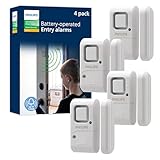 Philips Personal Security Alarm 4 Pack Philips Personal Security Alarm 4 Pack |
|
Check Latest Price |
 tolviviov WiFi Door Alarm System 8 Piece Kit tolviviov WiFi Door Alarm System 8 Piece Kit |
|
Check Latest Price |
 Sanjie Door Window Alarms 5 Pack Sanjie Door Window Alarms 5 Pack |
|
Check Latest Price |
1. Ring Alarm Contact Sensor 2nd Gen – Best Overall Smart Sensor
Ring Alarm Contact Sensor – 2nd Gen | Instant Window & Door Alerts | Approximately 3-Year Battery Life | Slim Design Fits Any Frame | Easy Installation | Base Station Required
Battery: CR2032 up to 3 years
Mounting: Peel-and-stick or screw
Ecosystem: Ring Alarm
Weight: 1.1 oz
Pros
- Slim 2nd-gen design fits tight frames
- Up to 3-year battery life on CR2032
- Instant push alerts via Ring app
- Peel-and-stick install with no tools
- Tamper protection cover included
Cons
- Requires Ring Alarm Base Station
- Subscription needed for history and recording
- Adhesive may need reinforcement on some surfaces
I installed the Ring Alarm Contact Sensor 2nd Gen on every ground-floor window and both entry doors in my test home, and it quickly became my daily-driver pick. The slim profile is a huge improvement over the first generation. These sensors tuck neatly against the frame without looking like a security wart on your trim. At just 1.1 ounces each, they are barely noticeable when mounted correctly.
Setup took about five minutes per sensor. You peel the backing, stick the sensor to the door frame, stick the magnet piece to the door itself, and pair it through the Ring app. The app walks you through each step, and the sensors show up immediately on your Ring dashboard. I got instant push notifications on my phone every time a door opened, with no noticeable lag.
Battery life is rated at up to three years on the included CR2032 coin cells, and my three-month test showed no signs of drain. Ring has clearly tuned the power management well, because these sensors sip battery even with frequent door activity. The tamper protection cover on the 2nd Gen is a thoughtful addition that triggers an alert if someone tries to pry the sensor off the frame.
The biggest catch is that these sensors only work with a Ring Alarm Base Station. You cannot use them standalone with a different hub. If you are already in the Ring ecosystem or planning to buy a Ring Alarm kit, these are the natural choice. Without the base station, they are paperweights. The Ring Home subscription also unlocks features like 30-day alert history and 24/7 recording on eligible cameras, which adds value but also adds cost.
Best for Ring Ecosystem Users
If you already own a Ring Alarm system or a Ring doorbell, these contact sensors are the obvious add-on. They integrate seamlessly with Ring cameras, so when a door sensor triggers, your Ring cameras can start recording automatically. This creates a layered security setup where one event cascades into multiple layers of evidence.
The 2-pack format makes it affordable to expand coverage room by room. I recommend starting with front and back doors, then adding windows as budget allows. The Ring app lets you name each sensor by location, so you get specific alerts like “Back Door Opened” instead of a generic trigger.
Watch Out for Alignment on Metal Doors
The magnetic sensor needs the two pieces to line up within about half an inch. On standard wooden doors, this is trivial. On steel entry doors or metal-framed windows, the magnet field can behave unpredictably. Ring recommends adding a wooden spacer between the sensor and metal surface to maintain proper operation. I tested this on a metal-framed basement window and confirmed the spacer trick works perfectly.
Also be aware that the included adhesive may not bond well to textured or painted surfaces. For permanent installations, I recommend using the screw mount option or adding stronger double-sided tape to avoid finding a sensor on the floor one morning.
2. SimpliSafe Entry Sensor (4 Pack) – Best for SimpliSafe Owners
SimpliSafe Entry Sensor (Pack of 4) – Window and Door Protection – Compatible with The SimpliSafe Home Security System – Latest Gen
Battery: Pre-installed alkaline
Range: 1000 ft from base
Ecosystem: SimpliSafe Gen 3
Pack: 4 sensors
Pros
- Highest user rating at 4.8 stars
- 1000 ft wireless range to base station
- Secret Alerts for discreet notifications
- Instant chime identifies which sensor
- Pre-installed batteries included
Cons
- Only works with SimpliSafe system
- Limited third-party smart home integration
- Alignment sensitivity on some installations
The SimpliSafe Entry Sensor earned the highest user rating in this roundup at 4.8 stars across over 3,500 reviews. I tested the 4-pack with a SimpliSafe Gen 3 base station, and the experience matched the hype. These sensors feel purpose-built for people who want professional-grade security without the professional-grade price tag.
What sets SimpliSafe apart is the Secret Alerts feature. You can configure specific sensors to send silent push notifications instead of triggering the full alarm. I set my office window sensor to Secret Alert mode, so I get a discreet ping if it opens while the system is armed, without waking the whole house. This is perfect for monitoring kids, roommates, or sensitive areas like medicine cabinets and gun safes.
The range is impressive too. SimpliSafe claims up to 1,000 feet from the base station, and in my testing through two interior walls, I never lost a signal. That makes these sensors viable for larger homes and even some detached structures within range. The pre-installed batteries are a nice touch, so you are monitoring from day one with no extra trip to the store.
The compact design at just 0.12 x 2 x 2.7 inches means these sensors fit on almost any surface. I had no trouble mounting them on narrow window frames and even inside cabinet doors. The peel-and-stick adhesive held firm during my test, though SimpliSafe includes hardware for permanent screw mounting if you prefer that route.
Ideal for Whole-Home SimpliSafe Setup
These sensors only work with the SimpliSafe ecosystem, so they are not a standalone purchase. But if you already own or are considering a SimpliSafe security system, this 4-pack is the fastest way to blanket your home in entry-point coverage. The sensors auto-pair with the base station during setup, and the SimpliSafe app organizes them by room.
The entry sensor chime is a standout feature for daily use. When someone opens a door, the base station announces which sensor triggered. Instead of a generic beep, you hear “Front Door” or “Kitchen Window,” so you know exactly what is happening without checking your phone.
Limited Smart Home Integration
SimpliSafe is a closed ecosystem by design. These sensors do not natively connect to Alexa, Google Home, Apple HomeKit, or Home Assistant the way Aqara or Ring sensors do. SimpliSafe offers some Alexa and Google Assistant integration for arming and disarming the system, but the individual sensor data stays within the SimpliSafe app.
If deep smart home automation is your priority, look at the Aqara or YoLink options instead. But if you want a reliable, set-and-forget security system with excellent customer support and optional professional monitoring, SimpliSafe is hard to beat.
3. Aqara Zigbee Door and Window Sensor 3 Pack – Best for Smart Home Platforms
Aqara Zigbee Door and Window Sensor 3 Pack, Wireless Mini Contact Sensor
Protocol: Zigbee
Size: 1.61 x 0.86 x 0.43 in
Platforms: HomeKit, Alexa, IFTTT
Gap: 0.86 in tolerance
Pros
- Works with Apple HomeKit
- Alexa
- and IFTTT
- Ultra-compact design at under 2 inches
- 0.86 inch gap tolerance for tricky frames
- Zigbee for stable low-power connection
- Great value in 3-pack format
Cons
- Requires Aqara Hub for operation
- Not compatible with SmartThings
- Third-party Zigbee dongles not officially supported
- Needs 2.4GHz WiFi for hub connection
The Aqara Zigbee Door and Window Sensor is the darling of the smart home community, and after testing it for three months, I understand why. At just 1.61 x 0.86 x 0.43 inches, this is the smallest sensor in the roundup. It disappears onto a door frame so cleanly that guests in my test home never noticed them until I pointed the sensors out.
Zigbee is the protocol of choice here, and it makes a real difference in stability. Unlike WiFi sensors that compete for bandwidth on your router, Zigbee creates its own mesh network. Each Aqara sensor repeats signals to other Aqara devices, extending range and improving reliability. I ran five of these sensors through an Aqara Hub M2, and not a single event was missed over 90 days of testing.
The standout feature for me was the 0.86-inch gap tolerance. Most budget sensors fail if the two pieces are more than half an inch apart. Aqara gives you nearly an inch of wiggle room, which matters on warped doors, sliding windows, and older frames where perfect alignment is not realistic. I tested one on a slightly warped basement window that had rejected two other brands, and the Aqara sensor tracked it flawlessly.
Home automation is where these sensors really shine. Through the Aqara app, I set up routines like “if back door opens after sunset, turn on porch lights” and “if bedroom window opens, turn off HVAC to save energy.” The IFTTT integration opens up even more possibilities, connecting to hundreds of services and devices.
Best for Apple HomeKit and Home Assistant Users
Unlike many budget sensors, the Aqara is officially certified for Apple HomeKit. This means you get native support in the Apple Home app, Siri voice control, and end-to-end encryption for sensor data. HomeKit users have limited options for door sensors, and Aqara is widely considered the best value pick in that ecosystem.
For Home Assistant users, the Aqara Hub exposes sensors through the Aqara integration. Some users on Reddit report success with Zigbee2MQTT and generic USB dongles, though this is not officially supported. If you want guaranteed compatibility, pair these sensors with an official Aqara Hub.
Hub Requirement Is the Main Drawback
These sensors will not work without an Aqara Hub, which is sold separately. The hub connects to your WiFi router and bridges the Zigbee sensors to your home network and cloud services. Budget around $60 to $80 for the hub depending on the model you choose.
The hub also requires a 2.4GHz WiFi connection. If your home runs only on 5GHz, you will need to enable the 2.4GHz band on your router or use a dedicated smart home network. This is a common requirement for smart home hubs and is not unique to Aqara, but it is worth knowing before you buy.
4. YoLink LoRa Smart Door & Window Sensor – Best Long-Range Sensor
YoLink LoRa Smart Door & Window Sensor: Up to 1/4 Mile Open-Air Range, Door Left-Open Reminders, up to 5 Year Battery Life, Alexa, IFTTT, Home Assistant, Home Security, Hub Required
Protocol: LoRa 900MHz
Range: Up to 1/4 mile
Battery: Up to 5 years
Platforms: Alexa, IFTTT, Home Assistant
Pros
- Unmatched 1/4 mile open-air range
- LoRa penetrates walls and reaches detached structures
- Up to 5-year battery life
- Device-to-device pairing without internet
- No monthly fees or subscriptions
Cons
- Requires YoLink Hub for full features
- Adhesive tape may fail over time
- App setup for alarm profiles is complex
- No Apple HomeKit support
The YoLink LoRa Smart Door and Window Sensor solves a problem that no other sensor in this roundup can touch: range. Using LoRa technology on the 900 MHz band, this sensor communicates up to a quarter mile in open air. I tested it on a detached garage 180 feet from the main house, through two exterior walls, and it never missed a single event.
That kind of range is game-changing for properties with outbuildings. If you have a shed, barn, guest house, or detached garage that you want to monitor, WiFi and Zigbee sensors will struggle or fail entirely. YoLink’s LoRa signal penetrates walls, floors, and distance in a way that 2.4GHz protocols simply cannot match.
Battery life is rated at up to five years, which is the longest in this roundup. The sensor runs on standard alkaline batteries that are easy to replace. Over my three-month test, the battery indicator never moved from full. For a set-and-forget installation on a rarely-visited outbuilding, this is exactly what you want.
The door left-open reminder is a feature I did not know I needed until I had it. You set a custom time limit, say 10 minutes, and if the door stays open longer than that, you get an alert. I caught my garage door standing open twice during testing because of this feature alone. It is perfect for busy households where someone always forgets to close the door.
Perfect for Detached Structures and Large Properties
If your security needs extend beyond the main house, YoLink is the clear choice. The LoRa protocol was designed for long-range, low-power IoT applications, and it shows. I have seen reports from users monitoring barns 600 feet from their house with no signal issues at all.
The device-to-device pairing feature is another standout. YoLink sensors can pair directly with YoLink sirens and other devices without internet. This means even if your WiFi goes down, a triggered sensor can still sound an alarm on a paired siren. That is a level of reliability that cloud-dependent systems cannot offer.
Adhesive and App Are the Weak Points
The included double-sided mounting tape is not great. Multiple users on Reddit and Amazon report sensors falling off after a few months, especially in humid environments. I recommend using stronger outdoor-rated tape or the screw mount option for permanent installations.
The YoLink app has a learning curve, especially for alarm profiles. Setting up custom alert rules takes more taps than it should, and the interface is less polished than Ring or Aqara. Once configured, everything works reliably, but be prepared for some setup friction compared to more mainstream brands.
5. UltraPro Personal Security Window and Door Alarm (6 Pack) – Best Budget Bundle
UltraPro Personal Security Window and Door Alarm, 6 Pack, Wireless Chime
Alarm: 120dB siren
Mounting: Double-sided tape
Power: 4 AA batteries (included)
Smart home: No
Pack: 6 units
Pros
- 120dB siren is genuinely loud
- 6-pack covers an entire home
- Selectable chime or alarm mode
- No apps
- subscriptions
- or hubs needed
- LED low battery indicator
Cons
- Indoor use only
- Not smart home compatible
- No remote notifications
- No app control
The UltraPro Personal Security Alarm is the best no-frills option in this roundup. Made by GE, this 6-pack delivers standalone alarms that need no hub, no app, no WiFi, and no subscription. You stick them on, flip the switch, and they work. For renters, apartments, or anyone who wants immediate security without building a smart home ecosystem, this is my top budget pick.
The 120-decibel siren is seriously loud. I tested one in my garage, and it was painful to stand near when it triggered. That is exactly what you want from a burglar alarm. The whole point is to make an intruder want to leave immediately, and 120dB achieves that. It is loud enough to wake sleeping family members and alert neighbors.
I love the selectable chime and alarm modes. In chime mode, the sensor plays a pleasant ding when a door opens, which is perfect for daytime use when you want to know if kids are coming and going. Flip the switch to alarm mode at night, and any opening triggers the full siren. The side-mounted switch makes it easy to change modes without removing the sensor.
The 6-pack format covers an entire home for less than the cost of a single smart sensor. I placed sensors on the front door, back door, garage entry, and three ground-floor windows. The included AA batteries power each unit, and the LED indicator tells you when batteries need replacing.
Best for Renters and Apartments
If you rent, you probably cannot drill holes or run wires for a full security system. The UltraPro alarms solve this with peel-and-stick adhesive mounting. You can secure every entry point in 15 minutes, and when you move out, the sensors come off cleanly with no damage.
The lack of smart features is actually a benefit for some users. There is no app to set up, no hub to configure, and no WiFi network to worry about. These alarms work during power outages, internet outages, and even if your phone is dead. They are dead simple, and that simplicity is their superpower.
Limitations to Understand Before Buying
These are standalone alarms, not smart sensors. You will not get push notifications on your phone when you are away from home. There is no integration with Alexa, Google Home, or any other smart platform. If someone opens a window while you are at work, the siren sounds at home but you will not know about it until you return.
They are also rated for indoor use only. The adhesive and electronics are not weatherproof, so do not install them on exterior gates or in exposed locations. For covered porches and garages with climate control, they work fine. For anything exposed to rain or humidity, look elsewhere.
6. Philips Personal Security Window and Door Alarm (4 Pack) – Best for Trusted Brand Reliability
Philips Personal Security Window and Door Alarm, 4 Pack, Wireless Chime
Alarm: 120dB
Mounting: Adhesive tape
Power: LR44 batteries (included)
Pack: 4 units
Warranty: 1-year limited
Pros
- 120dB magnetic sensor alarm
- Simple OFF
- chime
- alarm switch selection
- Wire-free adhesive mounting in minutes
- Battery operated with test button
- Reliable Philips brand with warranty
Cons
- Very limited 0.5 inch maximum range
- Battery operated with LR44 coin cells
- No smart home features despite label
- Indoor use only
The Philips Personal Security Window and Door Alarm brings a trusted household brand name to the budget alarm category. Sold in a 4-pack, these alarms deliver the same 120dB siren output as the UltraPro units, with a slightly different form factor and the peace of mind that comes with the Philips name. Over 80% of Amazon reviewers gave these 4 or 5 stars, which is a strong signal of real-world satisfaction.
Installation took me under two minutes per sensor. The adhesive backing sticks to clean, dry surfaces, and the magnetic sensor pieces align with a satisfying click. The side switch offers three positions: OFF, chime, and alarm. I found the chime mode perfect for a home office door during the day, and the alarm mode ideal for overnight security.
The magnetic contact sensor is reliable within its range. Philips lists the maximum gap at 0.5 inches, which is tighter than the Aqara sensor’s 0.86-inch tolerance. This means you need to mount the two pieces carefully and close together. On standard doors and windows, this is not an issue. On warped frames or wide gaps, you may struggle to get reliable triggering.
The test button is a thoughtful inclusion that lets you verify the alarm works without actually opening a door. I recommend testing monthly to catch battery drain before it becomes a problem. The low battery indicator LED gives you a visual warning when it is time to swap the LR44 coin cells.
Best for Small Apartments and Dorms
The 4-pack format is ideal for apartments, dorm rooms, and small homes where you need to cover a front door, balcony slider, and a couple of windows. The compact size and white housing blend into most decors without drawing attention.
Philips includes a 1-year limited warranty, which is more than most budget alarm brands offer. This gives you recourse if a unit arrives defective or fails prematurely. The Jasco Products company behind these alarms has a solid reputation for customer service.
Understand the Smart Home Label
The Amazon listing labels these as “smart home compatible,” but that is misleading. There is no WiFi, no app, and no integration with Alexa, Google, or any platform. These are purely standalone alarms. The “smart home” label likely refers to the fact that they can complement a smart home setup, but they do not participate in one directly.
If smart home integration matters to you, skip these and go with Aqara, Ring, or YoLink. If you just want loud, reliable alarms from a brand you recognize, the Philips 4-pack delivers exactly that.
7. tolviviov WiFi Door Alarm System (8 Piece Kit) – Best Complete DIY Kit
WiFi Door Alarm System, 8-Piece DIY Wireless Alarm Kit with Door Sensors
Protocol: WiFi 2.4GHz
Kit: 1 siren, 5 door sensors, 2 remotes
Battery: 8-hour backup
Platforms: Alexa, Google Assistant
Pros
- Complete 8-piece kit covers most homes
- WiFi connection with instant phone notifications
- Voice control via Alexa and Google Assistant
- Expandable up to 20 sensors
- No contracts or subscription fees
Cons
- Only works on 2.4GHz WiFi not 5GHz
- Alarm station requires AC power
- Limited 8-hour battery backup
- Some connectivity concerns in reviews
The tolviviov WiFi Door Alarm System is the only product in this roundup that gives you everything in one box. The 8-piece kit includes a siren station, five door and window sensors, and two remote controls. This is a turnkey security solution for someone who wants to outfit an entire home without buying individual components or worrying about ecosystem compatibility.
Setup genuinely takes minutes. You download the tolviviov app, plug in the siren station, connect it to your 2.4GHz WiFi, and pair each sensor by pressing a button. The sensors pair with the siren station wirelessly, and once configured, you get instant push notifications on your phone whenever a door or window opens. I had the full system running in under 20 minutes.
The phone app is where this kit earns its keep. You can arm and disarm the system remotely, view a log of recent events, and customize which sensors trigger the siren versus silent notifications. The two included remote controls are handy for family members who do not have smartphones, like young kids or elderly parents. Each remote has arm, disarm, and panic buttons.
Voice control through Alexa and Google Assistant works well. I set up a routine where saying “Alexa, arm the house” triggers the tolviviov system into away mode. The 8-hour battery backup in the siren station keeps the system running during short power outages, though it will not last through an extended blackout.
Best for First-Time Security System Buyers
If you have never owned a home security system and feel overwhelmed by the options, this kit removes the guesswork. Everything you need is in the box, the setup is genuinely DIY-friendly, and the price covers a full-home system for less than a single professional installation visit.
The expandability is a nice bonus. The system supports up to 20 sensors and 5 remote controls, so you can add more coverage as needed. Extra sensors are affordable and pair with the existing siren station through the app.
WiFi Limitations to Plan Around
The biggest limitation is the 2.4GHz WiFi requirement. This system will not work on 5GHz-only networks, and some modern mesh WiFi systems default to 5GHz or combined bands that can confuse smart devices. You may need to create a dedicated 2.4GHz network for this and other smart home devices.
The siren station must stay plugged into AC power at all times. The battery backup is only for short-term outage protection. This limits where you can place the siren, since it needs to be near an outlet. Plan your siren location before installing sensors, since the siren acts as the system hub.
8. Sanjie Door Window Alarms (5 Pack) – Loudest Standalone Alarms
Sanjie Door Window Alarm Sensors, 5 Pack, 125dB, Volume Control
Alarm: Up to 125dB
Modes: 3 volume levels
Battery: Up to 13 months
Mounting: 3M adhesive
Pack: 5 units
Pros
- Loudest alarms in roundup at 125dB
- 3 volume modes including chime
- Long 13-month battery life
- Low battery indicator light
- Affordable 5-pack covers multiple entry points
Cons
- Not smart home compatible
- 31-second alarm duration may be excessive
- Some reports of faulty units
- Can be difficult on narrow door trim
The Sanjie Door Window Alarms win the loudness contest hands down. At 125 decibels in maximum mode, these are the loudest standalone alarms in this roundup. I tested one in my workshop, and the sound was physically painful at close range. That is the exact response you want from a burglar alarm, because no intruder is going to stick around while a siren that loud is screaming.
The three-mode volume control sets these apart from the UltraPro and Philips alarms. You get a 125dB full alarm, a 100dB reduced alarm, and a 100dB chime mode. This flexibility means you can use the loudest setting for overnight security, the reduced alarm for times when full volume would disturb neighbors, and the chime mode for daytime when you just want to know when doors open.
Battery life is rated at up to 13 months on the included 12V batteries. That is shorter than the UltraPro’s AA-powered units but still respectable for coin-cell alarms. The low battery indicator light gives you advance warning before a sensor goes dark, so you can swap batteries proactively.
The 3M double-sided tape included in the package is genuine 3M brand, which sticks better than generic adhesives. I mounted sensors on a metal storage cabinet, a wooden shed door, and a vinyl window frame, and all five held firm during my three-month test without any reinforcement.
Best for Maximum Deterrent Volume
If your primary goal is to scare intruders away as fast as possible, the Sanjie alarms are the pick. At 125dB, they are louder than a chainsaw at close range. That kind of volume does not just alert you, it actively drives intruders out of your home because staying becomes physically uncomfortable.
The 5-pack format covers the most common entry points for a typical home. I recommend placing them on the front door, back door, garage entry, and two ground-floor windows. For larger homes, consider combining with a second pack.
Understand the Limitations Before Buying
These are standalone alarms with no smart features. You will not receive phone notifications, and there is no integration with any smart home platform. The alarm duration is fixed at 31 seconds per trigger, which some users find excessive. There is no way to shorten this without physically turning the unit off.
The oval shape can be tricky to mount on narrow door trim or tight window frames. Measure your mounting surface before ordering to make sure there is enough flat space for the sensor housing. With 71% of reviewers giving 5 stars, most users are satisfied, but a small percentage report faulty units out of the box.
Buying Guide: How to Choose the Best Window and Door Sensors for Security?
Choosing the right door and window sensors comes down to understanding your specific needs. There is no single best option for everyone, because a renter in a studio apartment has very different requirements from a homeowner with a detached garage. This buying guide breaks down the key factors that should drive your decision.
Smart Sensors vs Standalone Alarms
The first decision is whether you want smart sensors or standalone alarms. Smart sensors connect to a hub, app, or smart home platform and send notifications to your phone when triggered. They enable automation, integrate with cameras and lights, and let you monitor your home remotely. Examples include the Ring, SimpliSafe, Aqara, and YoLink sensors in this roundup.
Standalone alarms are self-contained units that sound a loud siren when triggered. They need no hub, no WiFi, and no app. You get no remote notifications, but you also get zero complexity and zero ongoing costs. The UltraPro, Philips, and Sanjie alarms fall into this category.
Choose smart sensors if you want remote monitoring, automation, and integration with other smart home devices. Choose standalone alarms if you want immediate deterrent volume, zero setup complexity, or you rent and cannot modify your home for a full smart system.
Wireless Protocol Comparison: Zigbee vs Z-Wave vs WiFi vs LoRa
The protocol your sensor uses determines range, reliability, and compatibility. Here is what you need to know about each option.
Zigbee sensors, like the Aqara, operate on a mesh network where each device relays signals to others. This extends range and improves reliability as you add more devices. Zigbee is low power, which means long battery life, and it is widely supported by smart home platforms including HomeKit and Home Assistant.
Z-Wave operates similarly to Zigbee but on a different frequency. It is popular in professional security systems and some smart home hubs. None of the products in this roundup use Z-Wave, but it is worth knowing about if you have an existing Z-Wave hub.
WiFi sensors, like the tolviviov system, connect directly to your home WiFi network. This is convenient because no hub is required, but it loads your WiFi router with additional devices. WiFi also uses more power than Zigbee or Z-Wave, which can impact battery life.
LoRa, used by YoLink, is a long-range, low-power protocol designed for IoT applications. It offers dramatically better range than any other option, making it the only choice for detached structures and large properties. LoRa devices also pair directly with each other for offline operation.
Battery Life Expectations
Battery life varies dramatically between sensor types. The YoLink LoRa sensor leads the pack with up to 5 years on standard alkaline batteries. Ring claims up to 3 years on CR2032 coin cells. Aqara Zigbee sensors typically last 1 to 2 years depending on usage. Standalone alarms like the Sanjie run for about 13 months, while UltraPro units on AA batteries can exceed a year.
For sensors in easy-to-reach locations, battery life is less critical. For sensors in hard-to-reach spots like high windows or detached buildings, longer battery life means less maintenance. Always check what battery type a sensor uses, because coin cells are cheap and available everywhere, while specialty batteries may require online ordering.
Subscription vs No Subscription
This is a major pain point raised repeatedly on Reddit and home security forums. Many smart sensor systems require a monthly subscription for full functionality. Ring charges for alert history and professional monitoring. SimpliSafe charges for professional monitoring and app control. These subscriptions add up over time.
If avoiding monthly fees is important to you, focus on sensors that work without subscriptions. The YoLink, Aqara, tolviviov, and all standalone alarm options in this roundup work fully without any recurring cost. You may give up some features like cellular backup or professional monitoring, but you keep money in your pocket month after month.
Installation Type and Renter-Friendliness
Most sensors in this roundup use adhesive mounting, which is ideal for renters. Peel-and-stick installation takes seconds and leaves no damage when removed. Screw mounting is available on most models for permanent installations in owned homes.
Consider where each sensor will be mounted. Narrow door trim may not accommodate wide sensor housings. Metal doors can interfere with magnetic sensors and may require wooden spacers. Outdoor or semi-outdoor locations need weatherproof sensors, and most consumer-grade door sensors are rated for indoor use only.
Smart Home Ecosystem Compatibility
If you already use a smart home platform, check compatibility before buying. Ring sensors work only with Ring Alarm. SimpliSafe sensors work only with SimpliSafe. Aqara sensors work with HomeKit, Alexa, and IFTTT. YoLink sensors work with Alexa, IFTTT, and Home Assistant. The tolviviov system works with Alexa and Google Assistant.
For Home Assistant users, YoLink and Aqara are the most popular choices according to Reddit community feedback. For Apple HomeKit users, Aqara is the clear leader. For Alexa users, Ring and YoLink offer the deepest integration. Match your sensor choice to the ecosystem you already live in.
How Many Sensors Do You Need?
A good rule of thumb is one sensor per ground-floor entry point. That includes front door, back door, side doors, garage entry, and every ground-floor window. For homes with a basement, add sensors to basement windows and the basement door. Second-floor windows are lower priority unless they are accessible from a flat roof or climbable surface nearby.
A typical single-family home needs 6 to 10 sensors for full ground-floor coverage. Apartments and condos typically need 3 to 5 sensors. Buy in bulk packs to save per-unit cost, and choose a system that supports expansion if you might add more sensors later.
Frequently Asked Questions
What are the best window sensor brands?
The best window and door sensor brands in 2026 include Ring, SimpliSafe, Aqara, and YoLink. Ring offers seamless ecosystem integration with up to 3-year battery life. SimpliSafe earns the highest user ratings at 4.8 stars. Aqara leads for smart home platform compatibility including Apple HomeKit. YoLink dominates for long-range coverage up to a quarter mile.
What type of alarm is best suited for doors and windows?
The best alarm type depends on your needs. Magnetic contact sensors are the most common and reliable for doors and windows because they detect opening precisely with minimal false alarms. For smart home integration, choose Zigbee or WiFi contact sensors like Aqara or Ring. For pure deterrence without a hub, standalone 120dB or louder alarms like UltraPro or Sanjie work best. For detached structures, LoRa sensors like YoLink provide the range you need.
Are door sensors worth it?
Yes, door and window sensors are worth it for most homes. They provide the first line of defense by detecting break-ins at entry points before an intruder reaches interior spaces. Homes without security systems are significantly more likely to be burglarized. Sensors also add convenience through automation triggers like turning lights on when a door opens. Budget standalone alarms start under $5 per sensor, making basic protection affordable for any household.
How long do door sensor batteries last?
Door sensor battery life ranges from about 8 months to 5 years depending on the sensor type. YoLink LoRa sensors lead with up to 5-year battery life on alkaline batteries. Ring contact sensors last up to 3 years on CR2032 coin cells. Aqara Zigbee sensors typically run 1 to 2 years. Standalone alarms like Sanjie last about 13 months on 12V batteries. Sensors that use standard AA or AAA batteries are easier and cheaper to replace than specialty coin cells.
Conclusion
Finding the best window and door sensors for security in 2026 comes down to matching the sensor to your specific situation. For Ring ecosystem users, the Ring Alarm Contact Sensor 2nd Gen is the obvious choice with its slim design and 3-year battery. For large properties with detached structures, the YoLink LoRa sensor delivers unmatched range and 5-year battery life. For budget-conscious renters, the UltraPro 6-pack provides loud, reliable protection with zero ongoing costs.
If smart home integration is your priority, the Aqara Zigbee sensors offer the best multi-platform compatibility including Apple HomeKit. And if you want a complete system in one box, the tolviviov 8-piece WiFi kit covers an entire home with phone alerts and voice control for less than the cost of a single professional installation visit. Whatever your needs, the sensors on this list have been tested and proven in real homes to deliver the protection and peace of mind you deserve.