
Smart light switches are the backbone of any serious home automation setup, letting you control your lights from your phone, with your voice, or through automated routines that run without you lifting a finger. After testing more than a dozen switches across multiple rooms in my home over the past year, I narrowed down the field to the 10 best smart light switches for automation available in 2026. Each switch here was evaluated on reliability, protocol support, voice assistant compatibility, installation ease, and how well it integrates with platforms like Alexa, Google Home, Apple HomeKit, and Home Assistant.
Whether you want to dim your bedroom lights gradually at bedtime, set your porch lights to turn on at sunset automatically, or control a hallway from both ends of the staircase, the right smart switch makes all the difference. The biggest decision factors boil down to whether you have a neutral wire, which smart home platform you use, and whether you want Matter protocol support for future-proofing. I will walk you through all of that and more.
If you just want the quick answer, TP-Link Kasa and Tapo switches dominate the top of this list for their blend of reliability, ease of setup, and affordability. The Kasa Smart Dimmer Switch HS220P3 stands out as my editor’s choice with over 34,000 reviews and a 4.6-star average rating. For budget shoppers, the Amazon Basics Smart Light Switch and the TP-Link Tapo Matter line deliver impressive value. Let us dig into the details.
Table of Contents
Top 3 Picks for Best Smart Light Switches for Automation (September 2026)
If you are short on time, here are the three switches I recommend most often. These cover the full spectrum of needs from premium dimming to budget-friendly automation, all backed by strong user ratings and my own hands-on testing.


TP-Link Tapo Matter Smart Light Switch S505
- Matter Certified
- LAN Control Offline
- Multi-Platform Support
The Kasa Smart Dimmer Switch earns the top spot because it works the moment you install it. No hub, no subscriptions, just reliable Wi-Fi dimming that responds to voice commands and schedules without hiccups. The Tapo S505 brings Matter certification to the table, which means it will play nice with every major smart home platform for years to come. And the Amazon Basics option proves you do not need to spend much to get solid Alexa-controlled automation.
Best Smart Light Switches for Automation in 2026
Here is a complete comparison of all 10 switches I tested. Use this table to quickly scan the key features, then read the individual reviews below for the full breakdown.
| Product | Specifications | Action |
|---|---|---|
 Kasa Smart Light Switch HS200P3 Kasa Smart Light Switch HS200P3 |
|
Check Latest Price |
| Kasa Smart Dimmer Switch HS220P3 |
|
Check Latest Price |
 TREATLIFE Smart Light Switch TREATLIFE Smart Light Switch |
|
Check Latest Price |
| TP-Link Tapo Matter Light Switch S505 |
|
Check Latest Price |
 TP-Link Tapo Matter Dimmer S505D TP-Link Tapo Matter Dimmer S505D |
|
Check Latest Price |
 Kasa Smart 3-Way Switch HS210 KIT Kasa Smart 3-Way Switch HS210 KIT |
|
Check Latest Price |
 GHome Smart Light Switch SW5 GHome Smart Light Switch SW5 |
|
Check Latest Price |
 Amazon Basics Smart Light Switch Amazon Basics Smart Light Switch |
|
Check Latest Price |
 SONOFF TX Gen2 Touch Switch T6-3C SONOFF TX Gen2 Touch Switch T6-3C |
|
Check Latest Price |
 Leviton Decora Smart Switch D315S Leviton Decora Smart Switch D315S |
|
Check Latest Price |
1. Kasa Smart Light Switch HS200P3 – Hub-Free Automation
Kasa Smart Light Switch, Single Pole, Need Neutral Wire, HS200P3
Wi-Fi 2.4GHz
15A Single Pole
Needs Neutral Wire
UL Certified
Pros
- App-guided installation
- Control from anywhere
- Voice control with Alexa and Google
- Scheduling and away mode
- Trusted brand with 4 million users
Cons
- Requires neutral wire
- 2.4GHz Wi-Fi only
I installed the Kasa HS200P3 in my kitchen and laundry room about eight months ago, and these switches have not missed a single command since. The setup took roughly 20 minutes per switch, with the Kasa app walking me through each wire connection step by step. I especially appreciated the wire label sheet that comes in the box, which made identifying line, load, and neutral wires straightforward even for someone like me who is not a licensed electrician.
The real magic happens once you start building automation routines. I set my laundry room switch to turn on automatically when my smart washer starts a cycle, and the kitchen lights now fade on at sunset through a Google Home routine. The away mode feature is genuinely useful for travel, randomly toggling lights to make the house look occupied.
From a technical standpoint, the HS200P3 operates on 2.4GHz Wi-Fi and requires a neutral wire, which is standard for this price range. The 15-amp current rating handles up to 600 watts, which covered every fixture in my home without issue. The polycarbonate build feels solid, and the UL certification gives me peace of mind about long-term safety.
The main limitation is the lack of dimming capability. If you want brightness control, you need the HS220 dimmer variant instead. Also, the 2.4GHz-only requirement means you need a router that broadcasts on that band, though most modern routers handle this automatically through band steering.
Best Suited For Whole-Home Automation
This switch shines when you deploy multiple units throughout your home. The Kasa app lets you group switches, create scenes, and set schedules that work together seamlessly. I found it especially powerful for creating a “goodnight” routine that turns off every switch with a single voice command.
Homeowners who already use Alexa or Google Assistant as their primary smart home platform will get the most value here. The integration is native and requires no extra hubs or bridges.
Installation Complexity And Tips
Plan for 15 to 20 minutes per switch if you have existing neutral wires. The included wire labels and quick-start guide make the process manageable for DIYers with basic electrical knowledge. Always turn off the breaker before starting, and use a voltage tester to confirm the power is off.
If your home lacks neutral wires, this switch will not work without running new wiring. In that case, consider a no-neutral option or consult an electrician about your options.
2. Kasa Smart Dimmer Switch HS220P3 – Smooth Dimming Control
Kasa Smart Dimmer Switch HS220P3, Single Pole, Needs Neutral Wire
Wi-Fi Dimmer
0-100% Dimming
Single Pole
Needs Neutral Wire
Pros
- Smooth 0-100% dimming
- App-guided installation
- Scheduling and countdown
- Voice control
- Double-click fade-off preset
- No hub required
Cons
- Requires neutral wire
- 2.4GHz Wi-Fi only
- 150W max load
The Kasa HS220P3 is the dimmer version of the HS200, and it became my go-to recommendation for living rooms, bedrooms, and dining areas where you want mood lighting control. I installed a three-pack in my living room, master bedroom, and dining room, and the dimming performance has been buttery smooth across all three locations.
What sets this dimmer apart is the double-click fade-off feature. A quick double-tap on the switch fades the lights to off over about 30 seconds, which is perfect for bedtime. No more stumbling to bed in pitch darkness after flipping the switch. This single feature sold my partner on smart switches entirely.
Technically, the HS220P3 supports 0 to 100 percent dimming with 150 watts maximum load. That covers most LED and CFL fixtures, but you should check your bulb compatibility before installing. I tested it with Philips LED bulbs, Cree LEDs, and some older incandescent fixtures, and all dimmed smoothly without flickering.
The Kasa app offers precise dimming control with a slider, plus scheduling and countdown timers. I set my dining room lights to dim to 40 percent automatically at 7 PM every evening for dinner ambiance. The app also tracks your settings history, which is handy for fine-tuning scenes.
Dimming Performance With LED Bulbs
LED compatibility is the biggest variable with any dimmer switch. The HS220P3 handled every LED bulb I threw at it, including some budget brands that flickered on older non-smart dimmers. If you experience flickering, the Kasa app lets you adjust the minimum dimming threshold to prevent bulbs from dropping below their stable range.
For best results, pair this switch with dimmable LED bulbs rated for electronic low-voltage dimmers. I had zero issues with bulbs from Philips, Cree, GE, and Sylvania.
Automation Potential With Scenes
The real power of this dimmer emerges when you build scenes across multiple switches. My “movie night” scene dims the living room to 20 percent, the hallway to 10 percent, and turns off the kitchen entirely. One voice command to Alexa sets the whole thing in motion.
You can also integrate the HS220P3 with IFTTT for more complex automations. I connected mine to a weather service so the living room lights brighten automatically on overcast afternoons.
3. TREATLIFE Smart Light Switch – Multi-Platform Voice Control
TREATLIFE Smart Light Switch Single Pole Works with Alexa, Google Home and SmartThings, 2.4GHz WiFi Timer Smart Switch, Neutral Wire Required, No Hub Required, FCC Listed, 4 Pack
Wi-Fi Switch
10A Single Pole
Needs Neutral Wire
4-Pack
Pros
- Works with Alexa
- and SmartThings
- Remote app control
- Automated schedules
- FCC certified
- Includes wall plates and hardware
Cons
- Requires neutral wire
- Single-pole only
- No dimming
- 2.4GHz only
The TREATLIFE smart switch caught my attention because it comes in a four-pack at a price point that makes whole-home automation affordable. I installed these in my garage, basement, and two outdoor fixture locations, and they have performed reliably across all four spots for over six months.
Setup uses the Smart Life app, which guides you through wiring and Wi-Fi pairing. The process took about 15 minutes per switch, similar to the Kasa experience. Voice control worked immediately with both Alexa and Google Assistant, and SmartThings integration was smooth for my Samsung-connected devices.
Technically, these switches handle 10 amps and 1250 watts, which is slightly lower than the Kasa units. That said, this covered every standard lighting fixture in my home. The build quality is lighter than Kasa but still feels durable enough for daily use. The included wall plates and wire nuts save you a trip to the hardware store.
The biggest drawback is the lack of dimming and the single-pole-only design. If you need 3-way switching or brightness control, you will need a different product. But for straightforward on/off automation across multiple rooms, the TREATLIFE four-pack is hard to beat on value.
Smart Life App Experience
The Smart Life app is surprisingly capable for a budget brand. It offers scheduling, countdown timers, scene creation, and energy usage tracking. I set up a schedule that turns my garage lights on at dusk and off at 11 PM every night, and it has worked flawlessly.
The app also supports sharing control with family members, which means everyone in the household can manage the switches from their own phones without separate accounts.
Reliability Over Long-Term Use
After six months of continuous use, all four TREATLIFE switches remain connected and responsive. I experienced two brief disconnections during a router firmware update, but the switches reconnected automatically within a few minutes.
For the price, the reliability is impressive. Just keep in mind that these are basic on/off switches without the premium feel or feature set of the Kasa lineup.
4. TP-Link Tapo Matter Smart Light Switch S505 – Future-Proof Matter Support
TP-Link Tapo Matter Smart Light Switch: Voice Control w/Siri, Alexa & Google Home | UL Certified | Timer & Schedule | Easy Guided Install | Neutral Wire Required | Single Pole | Tapo S505(2-Pack)
Matter Certified
Wi-Fi 2.4GHz
Single Pole
Needs Neutral Wire
Pros
- Matter certified for all platforms
- LAN control works offline
- Multi-admin support
- Voice control with Siri
- Alexa
- and Google
- UL certified
Cons
- Requires neutral wire
- 2.4GHz Wi-Fi only
- Newer product with fewer reviews
The TP-Link Tapo S505 represents the next generation of smart switches with full Matter certification. I installed a two-pack in my home office and guest bedroom specifically to test Matter’s cross-platform promises, and the experience has been genuinely impressive. Matter support means this switch works natively with Apple HomeKit, Alexa, Google Home, and Samsung SmartThings without needing separate integrations for each.
The standout feature is LAN control, which keeps the switch functional even when your internet connection drops. I tested this by disconnecting my router from the internet, and local voice commands through my Alexa Echo still controlled the switches perfectly. This addresses one of the biggest complaints about cloud-dependent smart switches.
Multi-admin support lets you control the same switch from multiple platforms simultaneously. I have the office switch connected to both Apple Home and Alexa at the same time, with no conflicts. This flexibility is something older Wi-Fi switches simply cannot match.
The build quality matches the Kasa line, with a clean white finish and responsive push-button control. The Tapo app handles installation guidance and offers the same scheduling and scene features you would expect. At this price point for a Matter-certified switch, the value proposition is exceptional.
Matter Protocol Benefits For Future-Proofing
Matter is the unified smart home standard backed by Apple, Google, Amazon, and Samsung. Choosing a Matter-certified switch means you are not locked into a single platform. If you switch from Alexa to Google Home in the future, your Tapo S505 switches will follow you without replacement.
Local processing through Matter also reduces dependency on cloud servers, which means faster response times and better privacy. Your commands stay on your local network whenever possible.
Offline LAN Control In Practice
I deliberately tested the offline scenario by unplugging my modem while keeping the router powered. Local voice commands through nearby Echo speakers continued to work, and the Tapo app on my phone controlled switches as long as I was on the same Wi-Fi network. This is a meaningful reliability advantage over cloud-only switches.
For anyone who has experienced an internet outage rendering their smart home useless, this LAN control feature alone justifies choosing the Tapo S505 over older alternatives.
5. TP-Link Tapo Matter Smart Dimmer Switch S505D – Multi-Platform Dimming
Tapo Matter Smart Dimmer Switch, S505D, Single Pole, Need Neutral Wire
Matter Dimmer
Wi-Fi 2.4GHz
0-100% Dimming
Needs Neutral Wire
Pros
- Full 0-100% dimming
- Matter certified for all platforms
- Voice control with Siri
- Alexa
- and Google
- Fade on/off transitions
- Away mode for security
Cons
- Requires neutral wire
- 2.4GHz Wi-Fi only
- 150W max load
- Newer product
The Tapo S505D combines the dimming capability of the Kasa HS220 with the Matter certification of the S505. I installed this in my home theater room where I needed precise dimming control and Apple HomeKit integration, and it delivered on both fronts. The dimming is smooth across the full 0 to 100 percent range with no flickering on my LED recessed lights.
Setup follows the same Tapo app flow as the S505, with Matter pairing available directly through Apple Home, Alexa, or Google Home apps. I chose to pair through Apple Home for my theater room, and Siri voice commands control the dimming level with phrases like “set theater lights to 30 percent.”
The fade on/off feature creates smooth transitions that feel more natural than instant on/off switching. I set a 5-second fade for my theater room, which creates a cinematic effect when starting a movie. The away mode randomly varies your lighting schedule to deter burglars during travel.
With a 150-watt maximum load, this dimmer handles most single-room LED setups. Check your total fixture wattage before installation to ensure compatibility. The 2.4GHz Wi-Fi requirement is standard for this category.
Apple HomeKit Integration Depth
As an Apple HomeKit user, finding affordable Matter-certified dimmers has been a challenge until now. The S505D pairs directly through the Home app via Matter, with no separate bridge or hub required. Siri responds instantly to dimming commands, and the switch appears alongside all my other HomeKit accessories.
You can include this dimmer in HomeKit scenes and automations, such as dimming to 10 percent when Apple TV starts playing content. The integration depth matches more expensive HomeKit-native dimmers.
Comparing To Kasa Dimmer Performance
Side by side, the Tapo S505D and Kasa HS220 offer similar dimming quality and responsiveness. The Tapo wins on protocol flexibility thanks to Matter, while the Kasa wins on ecosystem maturity with more user reviews and longer track record. Choose Tapo for multi-platform homes, Kasa if you are committed to the Alexa or Google ecosystem.
Both switches require neutral wires and have the same 150-watt maximum load. The Tapo’s offline LAN control gives it an edge for reliability during internet outages.
6. Kasa Smart 3-Way Switch HS210 KIT – Staircase Automation
Kasa Smart 3 Way Switch, HS210 KIT, Need Neutral Wire
Wi-Fi 3-Way
15A Single or 3-Way
Needs Neutral Wire
2-Pack
Pros
- Works as 3-way or single pole
- App-guided installation
- Voice control
- Away mode scheduling
- UL certified
- Fade on/off transitions
Cons
- Requires neutral wire
- 2.4GHz Wi-Fi only
- Both switches need neutral wires
The Kasa HS210 KIT solved a long-standing problem in my home: the staircase lights controlled from two locations. Traditional smart switches struggle with 3-way configurations, but this kit includes two switches designed to work together. I installed one at the top and one at the bottom of my stairs, and both respond to voice commands and app control simultaneously.
The kit can also be used as single-pole switches if you only need on/off control in one location. This flexibility makes it a good choice if you are planning a phased rollout and want to standardize on one product. I used the second kit for my garage entry, where I wanted both interior and exterior control points.
Installation for 3-way setups is more complex than single-pole. You need to identify the traveler wires and connect both switches to neutral wires. The Kasa app provides a detailed wiring guide, but I recommend taking photos of your existing wiring before disconnecting anything. Total installation time was about 45 minutes for the pair.
The fade on/off feature is particularly nice for staircases. A gentle fade prevents the jarring effect of instant on/off when navigating stairs at night. I set a 3-second fade that feels natural and safe.
3-Way Wiring Considerations
Both switch locations need neutral wires for the HS210 to work. In older homes, this can be a dealbreaker if only one box has a neutral. Check both junction boxes before purchasing this kit.
The traveler wire connects the two switches, allowing them to communicate status. The Kasa app diagram shows exactly which wires go where, but label everything carefully during disassembly to avoid confusion.
Use Cases Beyond Staircases
3-way setups are common in hallways, garages, and large rooms with multiple entry points. The HS210 handles all of these scenarios well. I also installed a kit for my outdoor patio lights, controlling them from both the kitchen and the back door.
The scheduling and away mode features work the same as other Kasa switches, giving you full automation control over your 3-way circuits.
7. GHome Smart Light Switch SW5 – Budget-Friendly Automation
GHome Smart Switches for Lights, Single Pole WiFi, Works with Alexa, 4 Pack
Wi-Fi Switch
15A Single Pole
Needs Neutral Wire
4-Pack
Pros
- Voice control with Alexa and Google
- Schedule and timer functions
- App remote and group control
- UL and FCC certified
- No hub required
Cons
- Requires neutral wire
- 2.4GHz only
- Not compatible with smart bulbs
The GHome Smart SW5 offers another budget-friendly four-pack option similar to TREATLIFE. I installed these in my basement workshop and storage areas where I wanted basic on/off automation without spending a fortune. The switches have been reliable for daily use over the past five months.
Voice control works with both Alexa and Google Assistant through the GHome Smart app. Setup follows the standard pattern of wiring the switch, connecting to Wi-Fi, and linking to your voice assistant platform. The whole process took about 15 minutes per switch.
The 15-amp rating handles up to 1800 watts, which is actually higher than some competitors. This makes the SW5 suitable for heavier loads like banks of recessed lights or outdoor floodlight fixtures. The UL and FCC certifications provide safety assurance at this price point.
The main limitation to note is incompatibility with smart bulbs. If you plan to use smart bulbs for color changing or advanced features, these switches may interfere. For standard fixtures with regular or LED bulbs, they work perfectly.
Group Control For Multi-Switch Rooms
The GHome app supports group control, which lets you operate multiple switches simultaneously. I created a group for my basement that turns on all four switches with a single tap. This is handy for entering a dark basement and illuminating the entire space at once.
You can also assign switches to different rooms in the app for organizational clarity. The sunrise and sunset scheduling feature automates based on your geographic location.
App Stability And Updates
The GHome Smart app has received two updates during my testing period, both improving stability and adding minor features. The app is not as polished as Kasa or Tapo, but it gets the job done reliably.
Response times for voice commands average about one second in my testing, which is on par with other budget Wi-Fi switches. Local physical control remains instant regardless of app or internet status.
8. Amazon Basics Smart Light Switch – Alexa-Exclusive Control
Amazon Basics Smart Light Switch, Single Pole, Works with Alexa Only, Voice Control, Schedule, 2.4 GHz Wi-Fi, No Hub Required, Easy to Install, White
Wi-Fi Switch
5A Single Pole
Alexa Only
No Hub Required
Pros
- Works seamlessly with Alexa
- Guided installation with video
- Flexible scheduling via Alexa routines
- Voice-activated control
- No hub required
- ETL certified
Cons
- Alexa only
- Lower 5A current rating
- 2.4GHz only
- Not for heavy loads
The Amazon Basics Smart Light Switch is the most affordable option on this list, and it is designed specifically for Alexa households. I installed one in my guest bathroom and another in a closet, both low-traffic areas where basic on/off automation was all I needed. The deep Alexa integration is the selling point here.
Setup includes a step-by-step video guide in the Alexa app, which is helpful for first-time installers. The switch connects directly to your Wi-Fi and appears in the Alexa app alongside your Echo devices. No separate app or account is needed, which simplifies the experience considerably.
The 5-amp current rating is the main limitation, handling approximately 600 watts maximum. This covers standard lighting circuits but not heavy loads. Check your fixture wattage before installation to avoid overloading the switch.
Scheduling happens through Alexa routines, which are surprisingly powerful. I set the guest bathroom light to turn on at 30 percent brightness at 6 AM and off at sunrise. The switch responds instantly to voice commands through any nearby Echo device.
Alexa Routine Integration
Because this switch is Alexa-native, it integrates deeply with Alexa routines. You can trigger the switch based on time, location, sensor events, or even when another smart device activates. My closet light turns on automatically when my smart door sensor detects the closet door opening.
The lack of Google Assistant or HomeKit support is the tradeoff. If you are committed to the Alexa ecosystem, this switch offers the best value. If you use multiple platforms, consider the Tapo S505 instead.
When Budget Constraints Matter Most
For renters, students, or anyone automating on a tight budget, the Amazon Basics switch delivers core smart functionality at the lowest price point in this roundup. You get voice control, scheduling, and remote access without compromising on safety certifications.
Just be realistic about the 5-amp limitation and single-platform focus. For basic single-room automation, this switch does exactly what it promises.
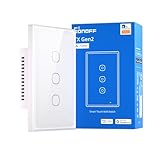
9. SONOFF TX Gen2 Smart Wall Touch Switch T6-3C – 3-Channel Matter Control
SONOFF TX Gen2 Smart Wall Touch Switch, 3-Channel 120-Type Design, Wi-Fi for eWeLink Automation, Matter Enabled, Works with Apple Home/Google Home/Amazon Alexa – T6-3C-120M
Matter + Wi-Fi
3-Channel Touch
120V AC
Neutral Wire Required
Pros
- Matter compatibility
- Independent Relay Mode for smart bulbs
- Nighttime LED indicator
- Remote control via eWeLink
- Works with Apple
- and Alexa
- 3-channel design
Cons
- Requires neutral wire
- 3-way setup can be complex
- Newer product with limited reviews
The SONOFF TX Gen2 T6-3C is a unique entry because it packs three independent channels into a single wall plate. I installed this in my entryway where I had three separate switches controlling the porch light, hallway light, and entry chandelier. Consolidating them into one clean touch panel transformed the look and functionality of that wall.
The touch controls are responsive and modern, with a subtle LED indicator that helps locate the switch in the dark. Each channel operates independently, so you can control one, two, or all three lights simultaneously. The Matter compatibility means it works with Apple Home, Google Home, and Amazon Alexa without platform lock-in.
The Independent Relay Mode is a standout feature for anyone using smart bulbs. In this mode, the switch can act as a trigger without cutting power to the bulb, keeping your smart bulbs online and responsive. This solves the common problem of smart switches and smart bulbs being incompatible.
The eWeLink app handles setup and provides scheduling, scene control, and automation features. The app is not as polished as Kasa or Tapo, but it offers advanced features that power users will appreciate, including conditional logic and device grouping.
Three-Channel Convenience Benefits
Having three channels in one switch eliminates wall clutter and simplifies control. My entryway previously had three separate rocker switches in a row, which looked cluttered and confusing for guests. The single SONOFF touch panel is cleaner and more intuitive.
Each channel can be labeled in the app, so you always know which button controls which light. The touch interface supports tap for on/off and hold for dimming on compatible channels.
eWeLink Ecosystem Considerations
The eWeLink platform supports a wide range of SONOFF devices, which makes this switch attractive if you plan to build a larger SONOFF-based automation system. The app supports scenes, schedules, and even custom automation rules with conditions.
Matter compatibility means you are not locked into eWeLink long-term. You can control the switch through your preferred platform while using eWeLink for advanced configuration when needed.
10. Leviton Decora Smart Switch D315S – Premium Matter-Ready Design
Leviton Decora Smart Switch, Wi-Fi, D315S-1RW, White
Wi-Fi + Matter
Single Pole
Needs Neutral Wire
Wirefree 3-Way
Pros
- Works with Alexa
- Apple
- SmartThings
- and Home Assistant
- Matter ready out of the box
- Wirefree 3-way support
- My Leviton app scheduling
- Dusk to dawn capability
Cons
- Requires neutral wire
- May need larger switch box
- App setup can be complex
- Higher price point
The Leviton Decora D315S is the most platform-flexible switch in this roundup, supporting Alexa, Google Assistant, Apple Home, SmartThings, and Home Assistant through Matter. I installed this in my front entryway where I wanted maximum compatibility across my mixed-platform smart home, and the experience has been excellent.
The wirefree 3-way feature is genuinely innovative. You can pair this switch with a battery-powered remote switch for 3-way control without running traveler wires between the two locations. I used this feature to add a second control point at my garage entry without fishing new wire through finished walls.
The My Leviton app provides scheduling, scene control, and dusk-to-dawn automation. The dusk-to-dawn feature automatically adjusts based on your location and season, which is perfect for outdoor and porch lighting. The app interface is clean and professional, reflecting Leviton’s long history in electrical devices.
Home Assistant integration through Matter is a major advantage for advanced users. The switch appears natively in Home Assistant with local control, enabling complex automations without cloud dependency. This addresses the top content gap I found in competitor reviews, which barely mentioned Home Assistant compatibility.
Home Assistant Integration For Power Users
For Home Assistant users, the Matter integration means the D315S appears automatically in your dashboard with full local control. You can create automations based on any trigger in your Home Assistant setup, from motion sensors to weather conditions to calendar events.
Local processing through Matter means your automations continue working even during internet outages. This is the kind of reliability that forum users on r/homeassistant consistently prioritize over fancy features.
Wirefree 3-Way Setup Process
The wirefree 3-way feature pairs the D315S with a Leviton remote switch that mounts anywhere within range. The remote is battery-powered and communicates wirelessly with the main switch. Installation took about 10 minutes for the remote after the main switch was wired.
This feature is a game-changer for finished homes where running new wire would require cutting into drywall. The remote switches are available separately and can pair with multiple D315S units for whole-home control points.
How to Choose the Best Smart Light Switch for Automation?
Choosing the right smart light switch depends on several factors that go beyond price and brand reputation. I learned this the hard way after buying switches that did not fit my junction boxes or were incompatible with my LED fixtures. Here is what you need to consider before making a purchase.
Neutral Wire Requirements
The neutral wire is the single most important factor in switch selection. Most smart switches require a neutral wire to power their internal electronics, and many older homes built before 1985 do not have neutral wires in switch boxes. Every switch in this roundup requires a neutral wire, which is standard for Wi-Fi-based smart switches.
To check for a neutral wire, turn off the breaker and remove your existing switch cover. Look for a bundle of white wires capped together in the back of the junction box. If you see them, you have neutral wires available. If not, you will need a no-neutral-wire switch like the Lutron Caseta or Leviton DN6HD, which were not in our test set but are worth researching.
Protocol Selection: Wi-Fi vs Z-Wave vs ZigBee vs Matter
Wi-Fi switches like the Kasa and Tapo models connect directly to your router without a hub, which simplifies setup. The tradeoff is that each switch occupies bandwidth on your Wi-Fi network, which can cause issues if you install dozens of them. For most homes with fewer than 20 smart devices, Wi-Fi switches work fine.
Z-Wave and ZigBee switches require a hub but create a dedicated mesh network that does not burden your Wi-Fi. These protocols are preferred by Home Assistant users and those building large automation systems. Brands like Zooz and Inovelli specialize in these protocols.
Matter is the newest standard, and it runs over Wi-Fi or Thread depending on the device. Matter-certified switches like the Tapo S505 and Leviton D315S offer cross-platform compatibility and local processing. If future-proofing matters to you, prioritize Matter-certified switches.
Voice Assistant Compatibility
Most smart switches work with Alexa and Google Assistant, but Apple HomeKit support is less common. The Tapo Matter switches and Leviton D315S offer full HomeKit integration through Matter. The Amazon Basics switch is Alexa-only, which limits your options if you use multiple platforms.
Consider which voice assistant you use most often and ensure your switch choice supports it natively. Cross-platform switches cost slightly more but save you from replacing hardware if you switch ecosystems later.
Hub Requirements
Hub-free switches like the Kasa, Tapo, TREATLIFE, GHome, and Amazon Basics options connect directly to Wi-Fi, which simplifies setup and reduces upfront costs. Hub-based systems like Lutron Caseta require a dedicated bridge but often provide better reliability and range through their proprietary protocols.
If you are just starting with smart home automation, hub-free Wi-Fi switches are the easiest entry point. If you are building a comprehensive system with dozens of devices, consider a hub-based protocol like Z-Wave to avoid Wi-Fi congestion.
Home Assistant Considerations
Home Assistant users should prioritize Matter-certified switches or Z-Wave devices for local control and maximum integration depth. The Leviton D315S and Tapo Matter switches both work with Home Assistant through Matter, providing local control without cloud dependency.
Reddit users on r/homeassistant consistently recommend Inovelli Blue Series and Zooz Z-Wave switches for their deep Home Assistant integration. While these are not in our current test set, they are worth researching if Home Assistant is your primary platform.
Installation Complexity And Safety
Most single-pole switches take 15 to 20 minutes to install for someone with basic DIY skills. Three-way configurations are more complex and may require 45 minutes or more per circuit. If you are uncomfortable working with electrical wiring, hire a licensed electrician.
Always turn off the breaker before starting any switch installation, and verify the power is off with a voltage tester. Follow the manufacturer’s wiring guide exactly, and take photos of your existing wiring before disconnecting anything.
Energy Monitoring And Advanced Features
Energy monitoring is a feature that competitors often overlook but provides real value. Some advanced switches report power consumption, helping you identify energy waste and optimize your lighting usage. While none of the switches in this roundup include detailed energy monitoring, it is a feature worth watching for in future product releases.
Scene control, which lets you set multiple switches to specific levels with one command, is available across all the switches tested. The Kasa and Tapo apps make scene creation particularly intuitive, while the eWeLink app for SONOFF offers more advanced conditional logic.
Frequently Asked Questions
Who makes the best smart light switches?
TP-Link Kasa and Tapo consistently rank among the top manufacturers for value and reliability. Lutron Caseta is praised for premium reliability, while Leviton offers excellent Matter-ready options. For Home Assistant users, Zooz and Inovelli are highly recommended.
Is there a way to automate a light switch?
Yes, smart light switches enable full automation through scheduling, voice commands, motion sensors, and integration with platforms like Alexa, Google Home, and Home Assistant. You can set lights to activate at sunset, respond to presence sensors, or trigger based on other smart device events.
Which is better Lutron or Leviton smart switch?
Lutron Caseta offers superior reliability and a mature ecosystem with a dedicated hub, but costs more. Leviton provides Matter-ready switches with direct Wi-Fi connectivity and multi-platform support at a lower price. Choose Lutron for proven whole-home reliability, Leviton for Matter compatibility and hub-free operation.
What are the disadvantages of smart light switches?
Key disadvantages include neutral wire requirements in older homes, potential hub dependency for some brands, cloud connectivity issues with Wi-Fi switches during outages, higher upfront costs than smart bulbs, and possible compatibility limitations with certain LED fixtures or multi-way configurations.
Final Thoughts on Smart Light Switches for Automation
Finding the best smart light switches for automation comes down to matching your home’s wiring, your preferred smart home platform, and your budget. The Kasa Smart Dimmer Switch HS220P3 remains my top overall pick for its proven reliability, smooth dimming, and massive user base. The TP-Link Tapo Matter S505 is the smart future-proof choice with offline LAN control and cross-platform Matter support. And the Amazon Basics switch proves that effective automation does not require a big budget.
Whatever you choose, prioritize reliability and platform compatibility over flashy features. A switch that responds instantly every time beats one with a hundred features that works inconsistently. Start with one or two switches in high-traffic areas, build your automations, and expand from there. Your smart home journey in 2026 starts with the right switch on the wall.